

Apps and actions
From utterance to action
Section titled “From utterance to action”utterance ─▶ router ─▶ Plan(steps) ─▶ executor ─▶ action handlers ─▶ desktop (rules + constrained decision head) (T0..T3)The router turns what you said into a plan:
- Deterministic rules. Multi-step plans (for example “close youtube” becomes focus, then close window) are returned directly.
- The constrained decision head. It enumerates a small set of fully resolved candidate
actions (at most 12 plus a mandatory “none”) and asks the local model to choose one by
letter. A choice below
decide_thresholdis an abstention. - The free-form planner, consulted only when the decision head is unavailable.
- Perception (accessibility first, vision last) is reached only for “click” steps.
The key safety property: the decision head chooses among precomputed candidates; it never authors free-form arguments. See Trust and safety.
Steps: the action vocabulary
Section titled “Steps: the action vocabulary”A plan is a list of steps, each an action with arguments, a tier, a description and a confirm flag. In the Python core the vocabulary is:
| Action | Typical args |
|---|---|
open_url | {url, new_tab?} |
ensure_url | {url, site?}, context-aware |
launch_app | {app} or {argv} |
ensure_app | {app, argv?}, context-aware |
focus_app | {app} |
search | {query} |
key | {chord} such as ctrl+t or Return |
type_text | {text} |
terminal | {command, enter?} |
niri | {command, args[]} |
media | {command}: play, pause, play-pause, next, previous, stop |
click_element | {description}, needs perception |
click_point | {x, y} |
scroll | {direction, amount} |
wait, speak, done | none |
In the plugin protocol these are strings plus JSON Schema, not a closed enum. A plugin advertises the ops it really supports.
The executor
Section titled “The executor”The executor dispatches each step and re-reads context between steps; the plan aborts on the
first failed step. click_element escalates from the accessibility tree (T1) to vision (T3).
The contextual resolver
Section titled “The contextual resolver”ensure_url decides whether to reuse an already-open tab or window, in order:
- A browser-tab match over WebDriver BiDi (Zen browser only, best-effort), including background tabs, followed by asking the compositor to raise that window.
- The focused browser already shows the site (window-title keyword).
- Another browser window’s title matches: focus it.
- A browser is open:
open_url, then focus that window. - No browser: launch one, or hand the URL to
xdg-open.
ensure_app is simpler: focus a window whose compositor app_id matches, else launch it.
Both read live window state from niri. Because niri’s focus-window does not cross workspaces,
Utter first resolves the window’s workspace and focuses that.
App profiles
Section titled “App profiles”App knowledge has layers, and yours win:
| Artefact | Path | Role |
|---|---|---|
| Curated profiles | utter/profiles/*.yaml (in the repo) | hand-written per-app rules for common apps |
| Per-kind defaults | utter/profiles/_defaults.yaml | shortcuts and search URL inherited by kind |
| Your profiles | ~/.config/utter/profiles/*.yaml | your own apps and edits; the settings app writes here; they win |
| Installed-app catalogue | ~/.local/share/utter/generated.yaml | a minimal profile for every installed .desktop entry, generated per machine |
| Raw catalog | ~/.local/share/utter/apps.json | parsed .desktop entries |
The repository ships a handful of common apps (Firefox, Chrome, VS Code, Files, Spotify) plus the generic per-kind fallbacks. Anything specific to one machine belongs in your profiles folder, and the catalogue is generated on each machine.
A profile has these fields: id, name, aliases, launch, terminal, new_window,
search_url (must contain {q}), shortcuts (name to key chord), app_ids (compositor app
ids), mime_types and kind.
Merge rules when the same app appears in several layers:
- shortcuts are merged;
- a curated or user
aliaseslist replaces the generated keyword-derived aliases; - other fields are replaced;
- kind defaults fill in missing shortcuts and a missing
search_url.
Name resolution is case-insensitive by id, then name, then alias, then a token-subset
fallback.
Building the catalog
Section titled “Building the catalog”scripts/gen_app_catalog.py scans .desktop files and writes both apps.json and
generated.yaml:
scripts/gen_app_catalog.py # scan and write both artefactsscripts/gen_app_catalog.py --dry-run # preview counts onlyScan order (highest precedence first): ~/.local/share/applications, flatpak exports,
/usr/local/share/applications, /usr/share/applications. Field codes like %u are stripped
from Exec, kind is inferred from Categories, and app_ids candidates come from
StartupWMClass, flatpak ids, the binary basename and the desktop-file id.
Editing shortcuts in the settings app
Section titled “Editing shortcuts in the settings app”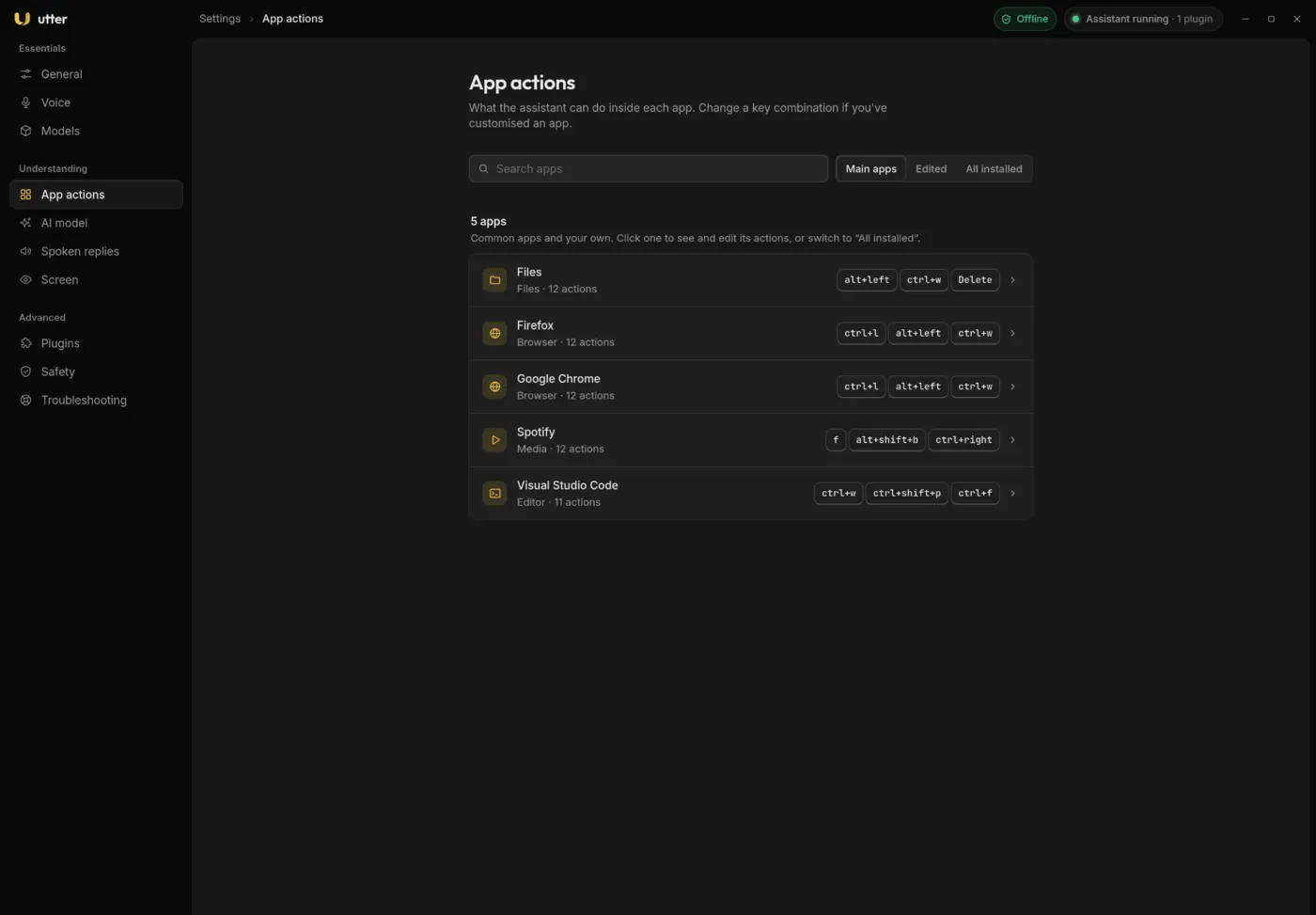
The App actions page lists your apps. Filter by All installed, Edited or Main apps, click one, and you get its editor:
- Names you can say: the aliases, separated by commas.
- Actions: each action is a name plus a key combination such as
ctrl+toralt+left. Change the keys, remove an action or add a new one. - Search address: used for “search … in this app”; must contain
{q}. - Opens with: the launch command.
- Restore built-in puts the hand-tuned profile back.
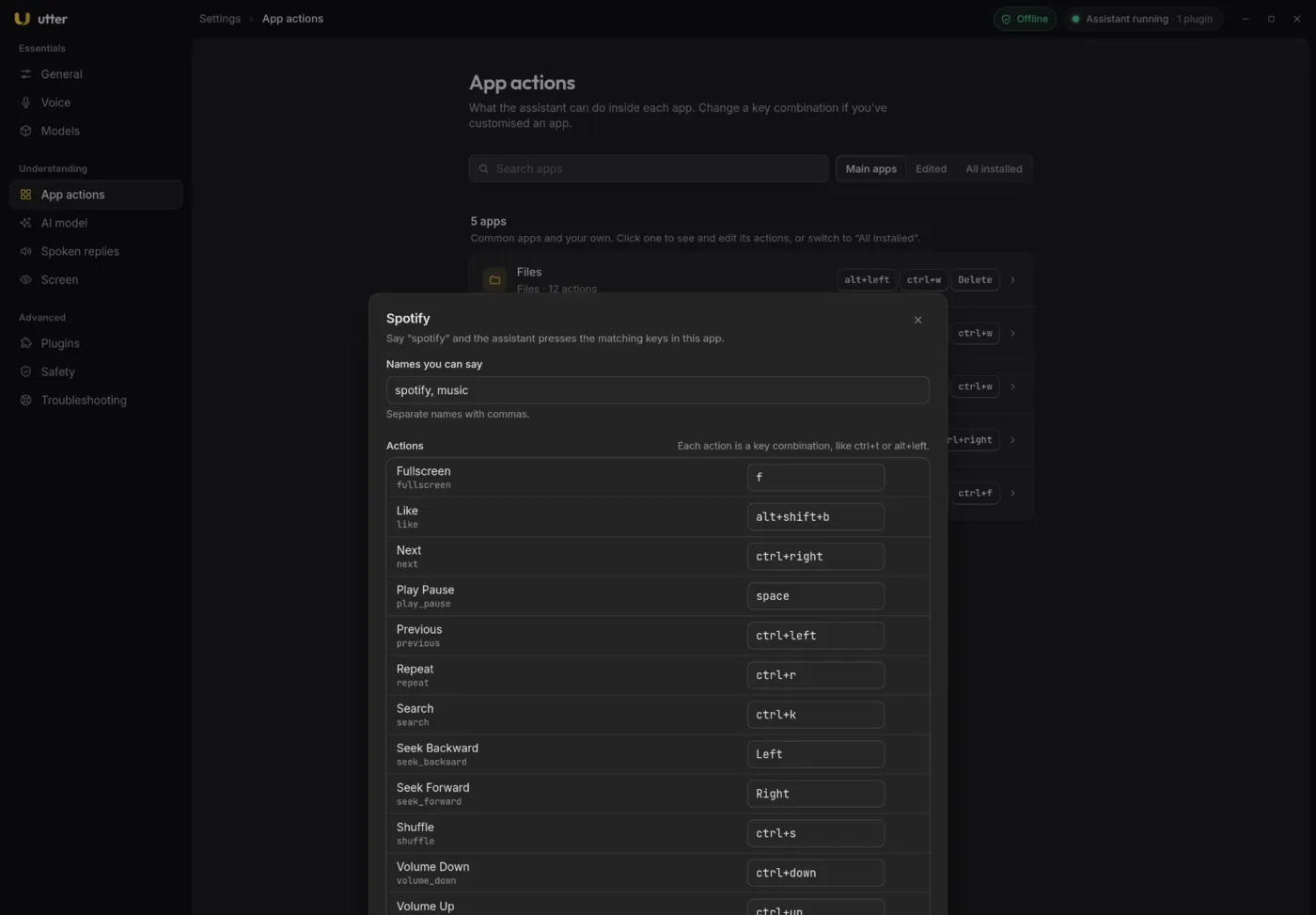
Edits are saved to ~/.config/utter/profiles/ and the assistant starts using them after its
next update. Say “new tab” in that app and Utter presses the matching keys.
niri compositor actions
Section titled “niri compositor actions”Phrases map to niri actions through a curated table plus workspace and monitor patterns;
additional phrases are loaded from utter/data/niri_phrases.json. The executor runs
niri msg action <command> [args...]. Examples: “focus right” is focus-column-right,
“fullscreen” is fullscreen-window, “workspace 3” is focus-workspace 3.
Regenerate the phrase map from your real niri config and the live action list:
scripts/gen_niri_phrases.pyIt reads ~/.config/niri/config.kdl (override with NIRI_CONFIG) and the bundled action list.
Every niri action gets an automatic phrase (dashes become spaces) and curated aliases win.
Terminal, CLI agents and media
Section titled “Terminal, CLI agents and media”- CLI agents. Spoken names map to argv (for example “opencode”). If a terminal is focused,
the agent runs there; otherwise it is launched in a new terminal (
foot -e <agent>). The list lives inutter/data/cli_agents.json. - Terminal commands. “run
” types into a focused terminal. This is a dangerous op and is off by default in the runner. - Media. Phrases map to
play,pause,play-pause,next,previousandstop, sent to the active MPRIS player over D-Bus. This works with any player, from mpv to a browser tab.
Adding a new application
Section titled “Adding a new application”- Create a profile
~/.config/utter/profiles/<kind>_<id>.yamlwith at leastid. Do not name it_defaults.yamlorgenerated.yaml; those names are reserved. - Add aliases (how you will say it) and
app_ids(the compositorapp_idorStartupWMClass; find it withniri msg --json windows). - (Optional) Add a known site to the
SITEStable inutter/router/rules.py. - (Optional) Add a terminal CLI preset to
utter/data/cli_agents.json. - (Optional) Add niri bind phrases to the curated list in
scripts/gen_niri_phrases.pyand regenerate. - Regenerate catalogs so the new app and phrases are picked up:
Terminal window scripts/gen_app_catalog.pyscripts/gen_niri_phrases.py # only if you touched niri phrases - Verify with a routing test (below).
A full example for a hypothetical chat app:
id: signalname: Signalaliases: [signal, signal messenger, signal app]launch: ["/usr/bin/signal-desktop", "--use-tray-icon"]terminal: falsenew_window: ["/usr/bin/signal-desktop", "--new-window"]search_url: nullshortcuts: new_window: ctrl+n find: ctrl+fapp_ids: [signal, Signal] # niri app_id / StartupWMClassmime_types: [] # e.g. x-scheme-handler/sgnlkind: other # browser | terminal | filemanager | editor | # media | game | office | utility | otherNotes:
- Prefer
launchas a list of argv tokens. The launcher spawns the list directly with no shell, so field codes are not needed. kindselects which per-kind defaults apply. Recognised kinds:browser,terminal,filemanager,editor,media,game,office,utility,other.search_urlmust contain{q}.
Browser tab control over WebDriver BiDi
Section titled “Browser tab control over WebDriver BiDi”“Open youtube” should activate an already-open YouTube tab, even in a background window, instead of opening a duplicate. Window titles cannot see background tabs, so the Zen browser is driven over the WebDriver BiDi remote agent.
- Zen only exposes BiDi when launched with
--remote-debugging-port=9222. A helper script writes a user.desktopoverride that adds the flag:Terminal window scripts/install-zen-bidi-desktop.sh # writes ~/.local/share/applications/zen-browser.desktopscripts/install-zen-bidi-desktop.sh --uninstallZEN_BIDI_PORToverrides the port. scripts/zen_bidi.pyis a small CLI withping,list,find <substr>,activate <context>andactivate-match <substr>. Find and activate must happen in one session because BiDi context ids are not stable across sessions.- The executor probes
127.0.0.1:9222, and if the agent is up, activates the matching tab and asks niri to raise the window (BiDi selects the tab but does not raise the window on Wayland). Any failure falls through to the window-title paths.
Caveats: loopback only; the port must be set at browser start; attaching a WebDriver session is
visible to pages through navigator.webdriver, and Utter does not try to hide it.
Other browsers. Firefox-family browsers (Firefox, LibreWolf, Waterfox) work the same way:
start them with --remote-debugging-port, set ZEN_BIDI_PORT, and adapt the app_id filter.
Chromium-family browsers use the Chrome DevTools Protocol instead, which the helper does not
speak; ensure_url still works for them through window titles, just without background-tab
awareness.
Verifying a routing change
Section titled “Verifying a routing change”# route without executing (prints the plan)python3 -m utter.daemon --text "open youtube" --dry-run
# the real assistant wrapped as a plugin through the runnerpython3 tests/m3/verify_m3.pyThe real-plugin verification asserts the vertical slice through the runner in dry-run mode: “open
youtube” becomes ensure_url for YouTube, “pull up youtube” takes the decision-head path,
“tile right” becomes the niri move-column-right action, and the policy checks (a terminal
step with screen provenance is rejected; with user provenance it is refused because the op is
disabled). After changing profiles or catalogs, re-run scripts/gen_app_catalog.py and check
that the app resolves. The full runner protocol suite is scripts/verify.sh.